


The Short Years Baby Book
4.7316.00 Reviews
App Specs
- Version
- 9.20
- Updated On
- License
- Free
- Downloads
- 50,000+
- Developer
- Unbound Applications
- Categories
- Parenting
- Platform
- Android
Screenshots
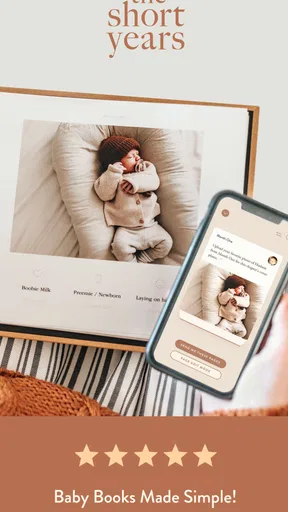
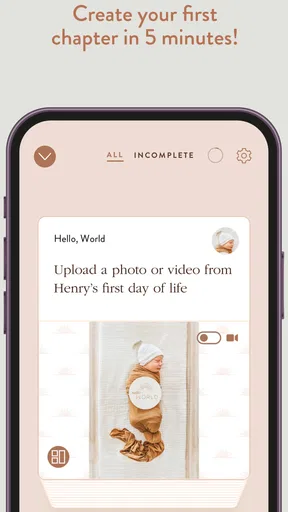


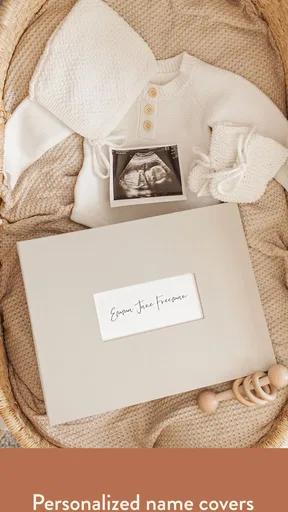

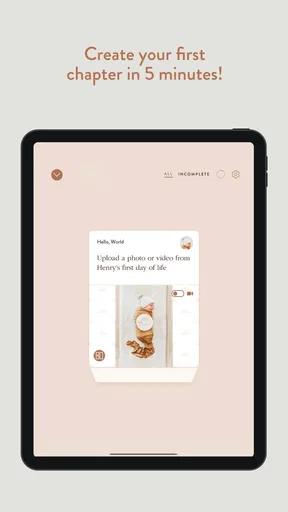
 Analysis by AppCompare
I like baby apps that respect the reality of new-parent life: short attention spans, interrupted evenings, and a camera roll already overflowing with photos. The Short Years Baby Book is built around that situation. It is a parenting app from Unbound Applications that helps me turn ordinary family moments into a more intentional baby book, without making the process feel like a second job.
After using it as a digital memory-keeping tool, my main impression is that its value comes from routine rather than complexity. The idea is simple: spend a small amount of time each week choosing and shaping memories instead of waiting until months have passed and the task feels impossible. That makes it especially appealing if you want something more personal than a folder of pictures but less demanding than a traditional scrapbook.
The app is free to start, is suitable for Everyone, and supports devices running Android 6.0 or later. Its current version is 9.20, and the project has been available since July 16, 2018. Those details matter because this is not a brand-new experiment; it has had time to develop into a focused product for families who want to preserve a child’s early years.
How The Short Years fits into everyday family life
The best way to understand the app is to imagine a normal week. Your baby learns to clap, takes an unusually long nap, meets a grandparent, or makes a face that seems unforgettable at the time. You take several photos, perhaps write a message to a family group, and then move on to feeding, work, errands, or bedtime. Without a system, those moments remain scattered across a phone.
The Short Years gives those memories a more deliberate home. I found the weekly rhythm more useful than trying to document everything. A short session on a quiet weekend can become a small record of what actually happened, rather than a huge archive that includes every blurry photograph and duplicate image.
The real strength is lowering the emotional and practical barrier to starting. You do not need to be a skilled scrapbook designer, and you do not need a free afternoon to make progress. For parents who want a keepsake but regularly postpone creative projects, that difference is important.
It also changes how I think about selection. A baby book is not necessarily better because it contains every image. Choosing one expressive photo and adding a meaningful sentence can preserve the feeling of a day more effectively than uploading twenty similar shots. The app encourages that kind of editing mindset, which is useful even before you open it: take fewer intentional photos, then return to the ones that tell a story.
Worth Reading Before You Choose

EA SPORTS FC Mobile 26 Is a Bigger Football Game, but It Takes Time

Flipboard Shows What News Apps Must Do Beyond the Feed

Switching to Android Auto Means Rethinking Your Driving Routine

Google Calendar Makes a Crowded Week Easier to Manage

Ludo King Makes the Most of the Minutes Between Plans

Baby Panda World Brings Quick Play to Modern Phones, but Its Game Library Feels Busy
A practical weekly workflow
My preferred approach is to set aside one predictable moment, such as after a weekly grocery trip or during a quiet part of the weekend. I look back through recent photos, choose a small group connected by a moment or theme, and write notes while the details are still fresh. If I wait until a birthday or holiday, the task becomes a catch-up project and loses the relaxed feeling that makes memory keeping enjoyable.
A helpful trick is to write in plain language rather than trying to sound literary. “You refused the blue spoon and laughed when Dad made a silly noise” is more valuable years later than a polished sentence that could describe any child. The app works best when I treat it as a place for specific family details, not as a performance.
Another useful habit is to include context that photographs cannot show. A picture may capture a smile, but a note can explain who was there, what happened just before it, or why the moment mattered to the family. This is one of the less obvious benefits of using a dedicated baby-book workflow instead of relying only on a phone gallery.
What has changed in the current version
The current release is version 9.20, which shows that Unbound Applications has continued maintaining the product beyond its original launch. I would describe the app’s evolution as refinement around its central purpose rather than a move into a completely different kind of parenting tool. The experience remains focused on creating a baby book, not on becoming a general family planner, medical tracker, or social network.
That focus is reassuring for existing users. An app that tries to cover every parenting task can become cluttered, while this one keeps its identity clear. At the same time, a version number alone should not be treated as proof that every personal preference has been addressed. The most important question is still whether its current workflow matches the way you want to record memories.
For someone joining now, the long-running nature of the app may make it feel less risky than choosing a brand-new journal product. For someone who already started using it, the practical benefit of a current release is continuity: you can keep building the same family record instead of repeatedly moving memories between unrelated services.
I would still approach updates with realistic expectations. Product evolution does not automatically mean that the app will gain every export option, design style, or sharing method a particular family wants. The safest reason to use it is that its core approach suits you today, not because you are waiting for it to become a different product later.
Who will get the most from it
This is a strong match for first-time parents who want a guided way to preserve early memories but do not identify as scrapbookers. It also suits relatives who want to contribute stories or help organize a child’s milestones without learning a complicated design program. Because the emphasis is on a baby book rather than a broad parenting dashboard, it can be easier to explain to a partner: choose meaningful moments, add context, and keep the record moving.
It is particularly useful for families who take many phone photos but rarely print anything. A camera roll is excellent for storage, but it is poor at telling a coherent story. Search can find a date or face, yet it does not necessarily preserve why a moment mattered. This app adds editorial judgment to the process, which is the part most automatic photo backups cannot provide.
It may also help parents who are returning to work and feel that the days are passing too quickly. A regular short session gives them a way to pause and notice changes without demanding a long nightly journal entry. In that situation, consistency matters more than detail. A few honest notes each week can create a much richer record than an ambitious system abandoned after a month.
Where it differs from ordinary alternatives
The usual alternatives fall into three groups: the phone’s photo gallery, a general notes app, or a physical scrapbook. The gallery is effortless but passive. It stores a huge number of images and leaves the work of organizing, captioning, and remembering entirely to you. A notes app is flexible, but that flexibility can become friction; you must invent the structure, decide how to handle photos, and keep the habit alive without much guidance.
A physical scrapbook offers a tactile result and may be the better choice if you love paper, printed photographs, stickers, and handwriting. It also gives family members something they can hold immediately. The trade-off is time, materials, storage space, and the possibility of postponing the project because each page feels like a craft assignment.
The Short Years sits between those options. It is more purposeful than a gallery and more structured than a blank note, while avoiding much of the physical work of paper scrapbooking. That middle position is its reason to exist. If you want a highly artistic album with complete control over every visual element, a dedicated design tool may suit you better. If you only want automatic photo backup, this will probably feel like extra effort.
There is also a difference in emotional tone. General parenting apps often focus on tasks, schedules, and information. This one is about reflection. It does not replace those practical tools, and I would not choose it expecting feeding records, sleep analysis, or developmental guidance. Its job is to help you remember family life, not manage every part of it.
Small decisions that make the result better
One of my favorite ways to use a baby-book app is to record ordinary transitions rather than only major milestones. First steps and birthdays are obvious, but the first time a child reaches for a particular toy, reacts to a family pet, or develops a funny bedtime ritual can become more revealing later. Those details show personality, and they are exactly the memories most likely to disappear from a standard album.
I also recommend separating “important” from “photogenic.” Some meaningful days produce poor pictures because the lighting is bad or everyone is tired. A short written entry can rescue those memories. Conversely, a beautiful photo does not always need a long explanation. Let the image carry the moment when it already does the work.
For families sharing the responsibility, decide who owns the weekly habit. If everyone assumes someone else will add the entry, the record can become inconsistent. One person can handle the main update while the other sends a sentence, date, or photo suggestion. That division keeps the app from becoming another vague household task.
There is a useful trade-off between speed and completeness. The quickest entries are easier to maintain, while longer entries may be more satisfying for major occasions. I would keep routine updates brief and reserve extra effort for moments that genuinely deserve it. Trying to make every week equally elaborate is the fastest way to turn a pleasant ritual into administrative work.
Costs, access, and the point where friction appears
The app is free, which makes it easy to try without committing money first. In-app purchases are listed at $7.99 per item, so families should pay attention to which parts of the experience require an additional purchase before building their entire routine around them. The free starting point is helpful, but it does not mean every possible keepsake-related option should be assumed to be included.
That pricing structure can be reasonable for someone who values a finished family record, but it may feel less attractive if you are comparing the app with tools you already own. A phone gallery costs nothing extra, and a notes app may already be part of your device. The question is whether the dedicated structure saves enough time and creates enough meaning to justify any optional spending.
Device compatibility is another practical consideration. Support for Android 6.0 or later covers many older phones, but anyone using an older device should check compatibility before planning a long-term archive. For a memory project, continuity matters: switching devices should not become the moment when your habit breaks.
The Everyone age rating also makes the app approachable for households where several generations may help with the book. That does not make every entry automatically suitable for sharing, of course. Parents should still decide which family moments remain private and which are appropriate for relatives or a wider audience.
Limitations I would consider before committing
The app’s focused design is both its advantage and its boundary. If you want detailed developmental tracking, reminders for appointments, feeding logs, or expert parenting content, you will need another tool. I would not install this expecting it to replace a complete parenting organizer.
It may also disappoint users who want total creative control. A dedicated scrapbook or layout editor generally offers more freedom over typography, spacing, decoration, and page composition. The Short Years is better suited to parents who want a finished result without spending their limited free time designing every element.
There is a commitment involved even when the weekly task is short. The app can make memory keeping easier, but it cannot supply the memories or the words. During difficult weeks, you may still skip an entry. That is not a failure; the important thing is to return without treating the missed time as a reason to abandon the whole book.
I would also be cautious about using it as the only place for irreplaceable photos. A dedicated baby book is a presentation and reflection layer, not a substitute for keeping original images safely backed up elsewhere. Maintain your normal photo backup routine so the book remains a meaningful selection rather than the sole copy of family history.
How current users can get more from it
If you already have months of unused photos, do not begin by trying to reconstruct every missing week. Start with a small set of turning points and then continue from the present. This avoids the common trap of spending all your energy on recovery and never establishing the habit the app is meant to support.
For an existing book, review older entries occasionally with a practical question: does each one tell you something that the image alone would not? If not, add a detail while you still remember it. That might be a new word, a reaction, a family member’s comment, or the setting around the photo. This turns the app from a collection of images into a record with a voice.
It is also worth creating a simple family vocabulary for recurring moments. Instead of writing “playtime,” mention the specific game, song, or object involved. These small distinctions make later browsing more rewarding and help relatives understand the story without needing to ask what was happening.
Keep expectations flexible as your child grows. The memories that deserve space will change from week to week. Early entries may focus on expressions and routines; later ones may capture conversations, preferences, friendships, or surprising opinions. A rigid template can make the record feel repetitive, while an adaptable personal approach keeps it connected to real family life.
What I would watch as the product continues
Because the app has reached version 9.20 and remains actively positioned as a baby-book tool, I would watch how future releases handle long-term ownership of memories. For me, the most valuable improvements would be anything that makes an established archive easier to maintain, revisit, and preserve as children grow older. That is an expectation about what matters in this category, not a promise about a future release.
I would also pay attention to whether the experience continues to stay calm and focused. Parenting software can become overwhelming when it adds too many dashboards, prompts, or obligations. The Short Years is most convincing when it protects the small weekly ritual at its center. More options would only help if they do not make that ritual feel like paperwork.
Existing users should therefore judge updates by practical continuity rather than by the size of the version number. Does the app still make it easy to add a memory when you have only a few minutes? Does it remain comfortable for a partner or relative to understand? Does the finished book still feel like your family rather than a generic template? Those are more important questions than whether a release sounds impressive.
For new users, my advice is to try the free experience with a realistic test: choose one recent moment, write the kind of note you would want to read years from now, and see whether the process feels natural. Do not evaluate it by how many photos you can import. Evaluate it by whether it helps you notice and preserve one meaningful story.
Overall, I recommend The Short Years Baby Book to parents who want a guided, low-pressure way to turn scattered baby photos into a personal record. Its free entry point, Everyone rating, broad older-device support, and continued development make it approachable, while the optional purchases mean you should consider your preferred level of investment. It is not a complete parenting manager or a replacement for secure photo backup; it is a focused memory-making habit.
If you want automatic organization, a blank journal, or elaborate paper-craft control, another option may fit better. But if you keep telling yourself that you will make a baby book “someday,” this is the kind of app I would suggest trying now. The most valuable result is not a perfect album. It is a growing collection of specific, everyday memories that might otherwise vanish into the camera roll.
Pros
- Simple way to record milestones
- photos
- and memories in one place.
- Organized timeline makes it easy to revisit your child’s early years.
- Useful prompts can help parents remember details worth documenting.
- Digital format reduces the need for separate notebooks or photo albums.
- Makes a thoughtful keepsake that can be shared with family members.
Cons
- Some features or templates may require in-app purchases or a subscription.
- Cloud storage and sharing options may depend on the developer’s policies.
- Entering memories regularly can feel like another task for busy parents.
- Limited customization may not suit families wanting a fully unique design.
- Exporting the finished baby book may offer fewer formats than expected.
FAQs for The Short Years Baby Book
What is The Short Years Baby Book?
The Short Years Baby Book is a digital memory-keeping app designed to help parents document a child’s early years. It typically lets you save photos, write milestones, record stories, and organize memories into a structured baby book. Instead of keeping everything scattered across a camera roll or social media account, the app provides a dedicated place for meaningful moments and family memories.
How does The Short Years Baby Book work?
After creating an account, you can generally add information about your baby, upload photographs, and write notes about important events, everyday experiences, and developmental milestones. The app organizes entries by age or stage, making it easier to follow your child’s growth over time. Its guided format can be especially useful for parents who want to keep memories but need prompts and structure.
Can I use The Short Years Baby Book with more than one parent or family member?
The Short Years Baby Book may support sharing or collaborative access, depending on the current version and account plan. This can allow parents, grandparents, or other trusted family members to contribute photos and memories. Before downloading, check the app’s latest description and privacy settings to confirm how invitations work, how many people can participate, and whether shared users can edit or only view content.
Is The Short Years Baby Book free to download and use?
The app may be free to download while offering optional paid features, subscriptions, or printed-book services. Costs can vary according to the tools you use, such as premium templates, additional storage, or ordering a physical memory book. We recommend reviewing the in-app purchase details in the Google Play Store or Apple App Store before starting, particularly if you intend to create multiple books.
Is my baby’s information and photography private in The Short Years Baby Book?
Privacy is an important consideration because the app may contain children’s photographs, names, dates, and personal family stories. Review the developer’s privacy policy to understand how content is stored, processed, and shared. Use a strong password, enable available security options, and avoid inviting people you do not trust. Also check whether you can export or delete your memories if you stop using the service.


